
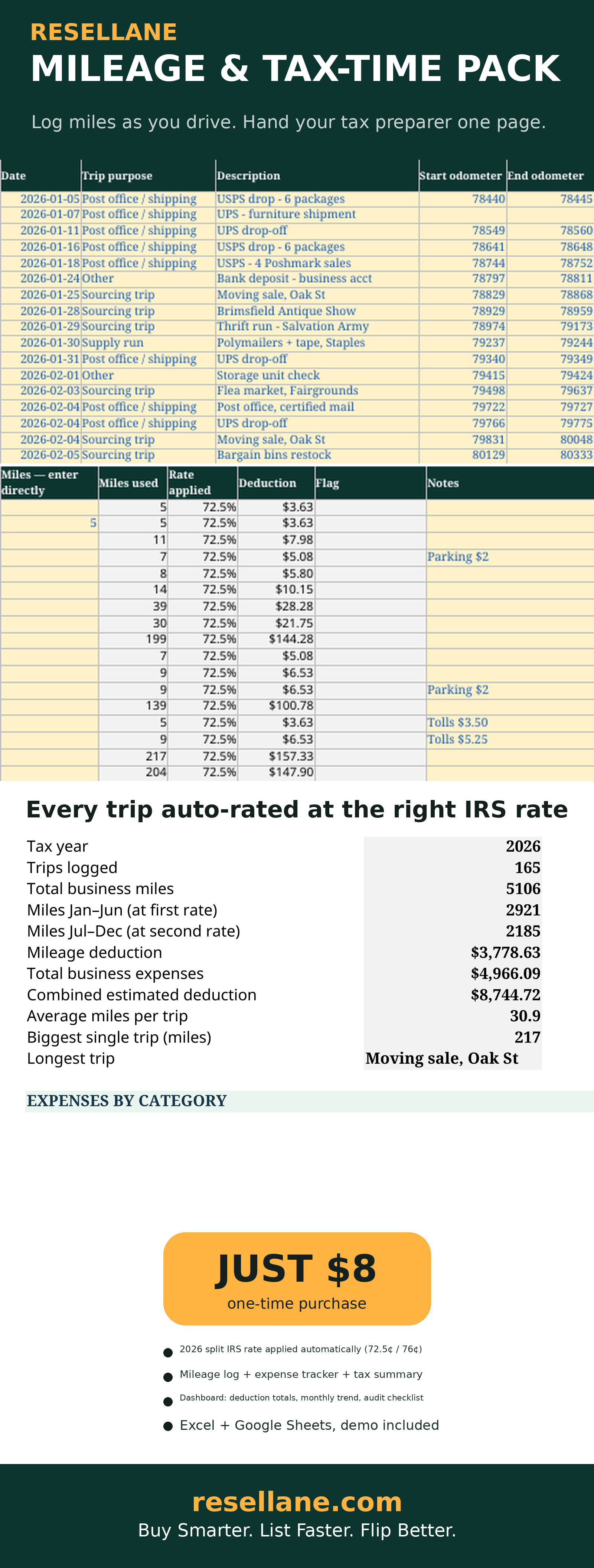
The real sheet, with a 165-trip demo year — every mile rated, every expense categorized.
Log miles as you drive. Hand your preparer one page.
One row per trip — date, purpose, odometer or miles — and the sheet calculates your deduction at the correct IRS standard mileage rate automatically.
- Mileage log for 200 trips — date, purpose, odometer or miles, auto deduction at the correct IRS rate
- 2026 split-rate logic built in — 72.5¢/mile before July 1, 76¢/mile after, picked from the trip date
- Expense tracker with Schedule C-friendly categories and auto monthly totals
- Dashboard: total miles, mileage deduction, expenses by category, 12-month trend, tax-time checklist
- One-page Tax Summary — the page you hand your tax preparer
- Clean workbook + filled 165-trip demo + Start Here PDF
- Includes Excel + Google Sheets versions — every purchase comes with both workbooks and a one-click Sheets copy link.
Secure checkout via Payhip. Your digital downloads are delivered automatically after purchase.
Not ready to buy? Try the free calculator first — no signup needed.
Already bought it? Tell us how it's going — 2 minutes, shapes what we build next.
April, without the panic.
The right rate, every trip
2026 is a split-rate year: 72.5¢/mile for trips Jan 1–Jun 30, 76¢/mile for trips Jul 1–Dec 31. The sheet reads each trip’s date and applies the right one — both rates and the split date live on SETTINGS, so a future IRS change is a one-cell edit.
Odometer or miles — your call
Enter start/end odometer readings or just the miles; the sheet uses your direct entry when present and odometer math otherwise, and flags CHECK ODOMETER or LONG TRIP when something looks off.
A checklist that says READY
The dashboard audits your own log — missing dates, missing purposes, odometer warnings, uncategorized expenses — and gives an Audit-ready? verdict before you file.
Before you buy
What exactly do I get?
The Mileage & Tax-Time Pack workbook (START HERE, SETTINGS, MILEAGE LOG with 200 rows, EXPENSES with 200 rows, DASHBOARD, and TAX SUMMARY tabs), a filled 165-trip demo year — 5,106 business miles, a $3,778.63 mileage deduction, and an $8,744.72 combined deduction — and a Start Here PDF guide. Excel (.xlsx) and Google Sheets versions.
How does the split rate work?
The IRS raised the business standard mileage rate mid-2026: 72.5¢/mile for trips January 1–June 30, 76¢/mile for trips July 1–December 31. The sheet reads each trip’s date and applies the correct rate — a trip dated exactly July 1 uses the second rate. Both rates and the split date are editable on SETTINGS.
Can I use Excel or Google Sheets?
Yes. Open the .xlsx files in Microsoft Excel, or upload them to Google Drive and open in Google Sheets. Formulas and dropdowns work in both. Editing is easiest on a computer.
How do I receive the files?
Payhip delivers your digital downloads automatically after checkout. No physical item is shipped.
Is this tax advice?
No — it’s an organizational tool that totals your miles and expenses at the right IRS rates. It is not tax advice. When in doubt, ask a tax professional.
Where can I get help?
Contact support@resellane.com for access or product functionality questions.