

Price your next sale
Reseller Fee & Profit Calculator
Estimate fees, net profit, margin and ROI before you list an item or accept an offer.
- One-sale fee + profit breakdown
- Break-even + target-profit pricing
- Works with Excel + Google Sheets
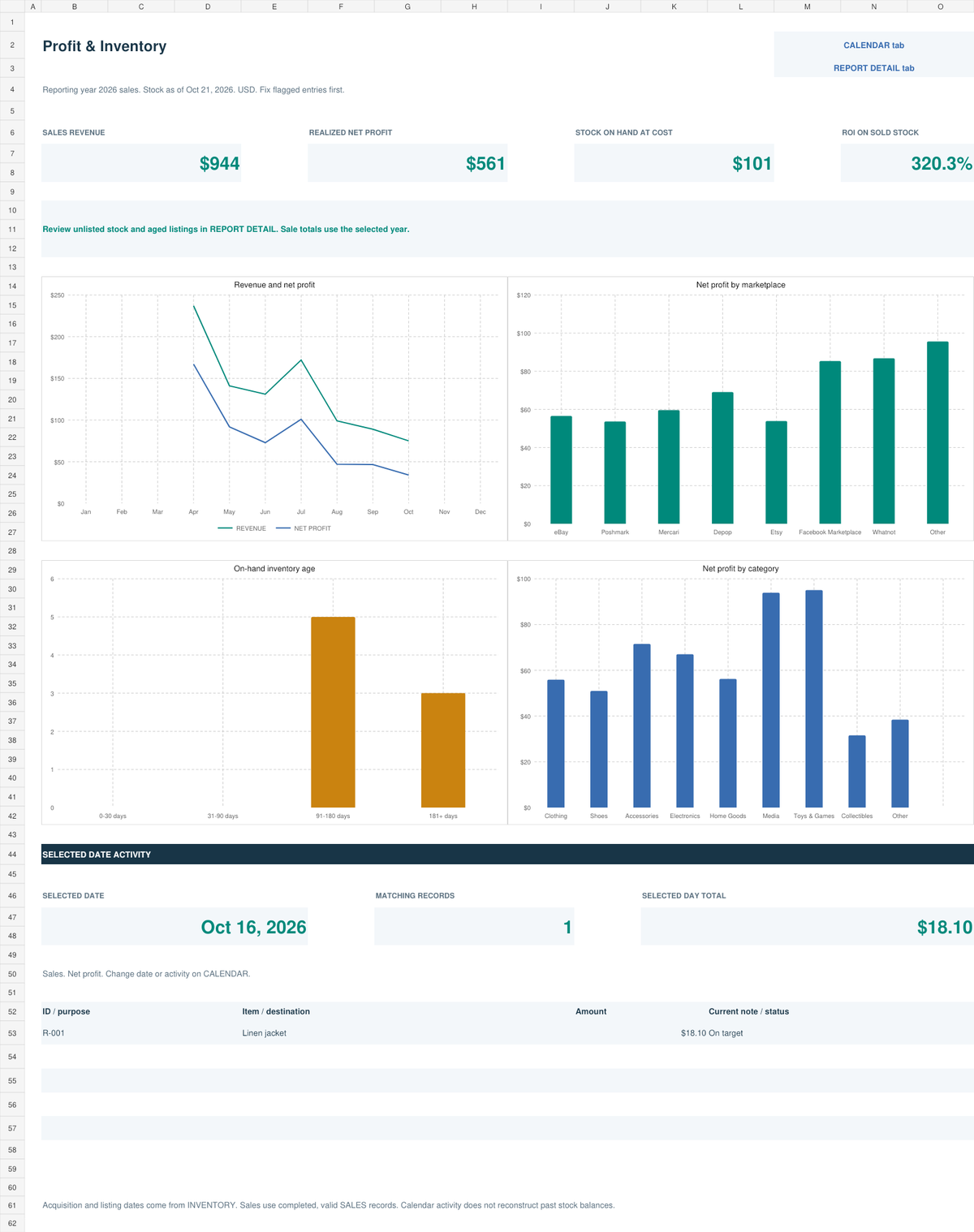
See the actual workbook dashboard first. Switch to the included browser dashboard, activity calendar, or product overview. Sample data is for illustration.
Know what you paid. Know what you made.
Launch price · one-time purchase
Secure checkout via Payhip. Digital access is delivered automatically after purchase.
Excel workbook + demo, Google Sheets copies, HTML dashboard and guides. One-time payment, digital delivery through Payhip.
The interactive sample is limited and uses practice data; the full files are delivered after purchase.
Not ready to buy? Try the free calculator first — no signup needed.
Want to see it in action? Try the live dashboard — the real thing, with practice data.
Already bought it? Tell us how it's going — 2 minutes, shapes what we build next.
The purchased files include the items below. The live web sample is separate from the full paid tool.
Excel and Google Sheets copies do not sync. Records are entered manually; no marketplace account connection.
Excel and Google Sheets are separate working copies, with no automatic synchronization. HTML dashboards open locally in a modern browser. Check product instructions for the supported workflow.
Payhip handles checkout and download delivery. For access problems or product help email support@resellane.com. Read the digital product policy.
Example screens and sample data illustrate workflows; no automatic marketplace connection or guaranteed resale income is provided.
SKU, item, category, source, purchase date, purchase cost, sourcing costs, listing date, listing price, marketplace, storage location, status, sold date, and days held.
Sale price, buyer-paid shipping, discounts, COGS, marketplace fees, payment fees, fixed fees, shipping label, packaging, and other expenses.
Gross collected, net profit, ROI, profit margin, inventory value, average sale price, average profit per sale, marketplace profit, and monthly profit trend.
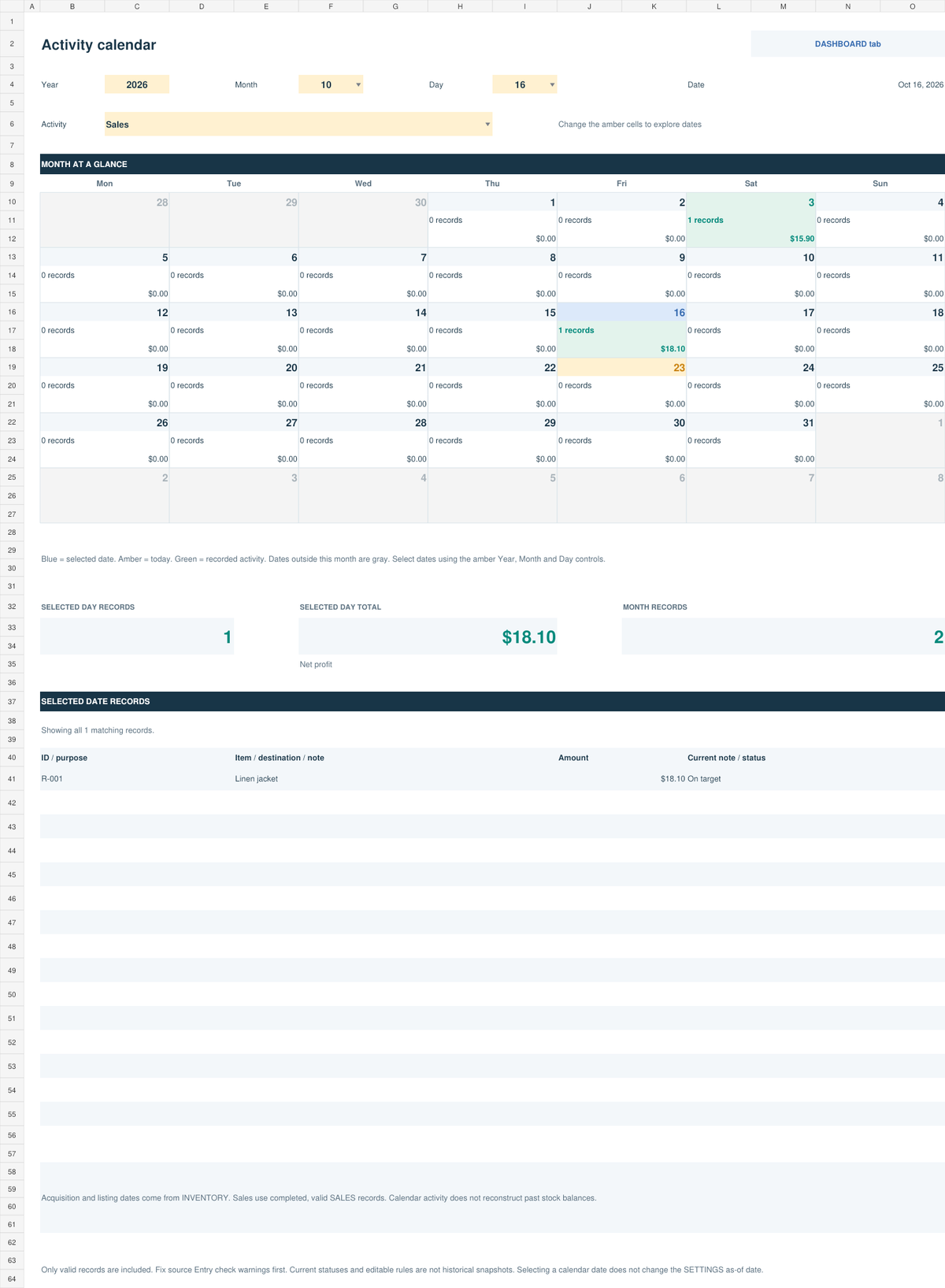
Google Sheets access and an Excel (.xlsx) workbook, each with START HERE, SETTINGS, INVENTORY, SALES, DASHBOARD, REPORT DETAIL, and CALENDAR tabs. A web dashboard is included too — open it in any browser to see your numbers without opening the spreadsheet.
A separate fictional demo in Google Sheets and Excel, with 24 inventory items and 16 sample sales — $944 revenue, $560.56 net profit, 320.3% ROI in the demo.
The START HERE guide (PDF) and Quick Start file explain how to choose your format, set defaults, record inventory and sales, use overrides, and read the dashboard.
A standalone web page included in your download. Open it in any browser — Chrome, Edge, Firefox, or Safari — to see your numbers with charts and totals, using the same data as the workbook. It works offline, needs no account, and you can open your own Excel copy in it and download an updated file when you are done.
Product #1 includes Google Sheets access plus downloadable Excel (.xlsx) files for both the clean tracker and filled demo. A web dashboard (HTML) is also included in the package. The START HERE guide and Quick Start file explain both setup paths.
Only if you choose the Excel edition. Use Microsoft 365 or Excel 2019 or later. You can use the Google Sheets edition instead by saving a copy to your own Google Drive.
No. Choose one working copy for your records. Changes in one format do not update the other.
The tracker is marketplace-flexible and is designed for channels such as eBay, Poshmark, Mercari, Depop, Etsy, Whatnot, Facebook Marketplace, and other resale channels. Resellane is not affiliated with those marketplaces.
No. Inventory and sales are entered manually, keeping the tracker portable and usable without paid integrations.
Enter the actual amount in the matching transaction-level override field. The override takes priority over the default estimate.
No. It is an organizational and profitability-tracking tool and is not tax, accounting, legal, or financial advice.
Use the standalone calculator to test an asking price or offer, then record the completed sale in your tracker.
Price your next sale
Estimate fees, net profit, margin and ROI before you list an item or accept an offer.